
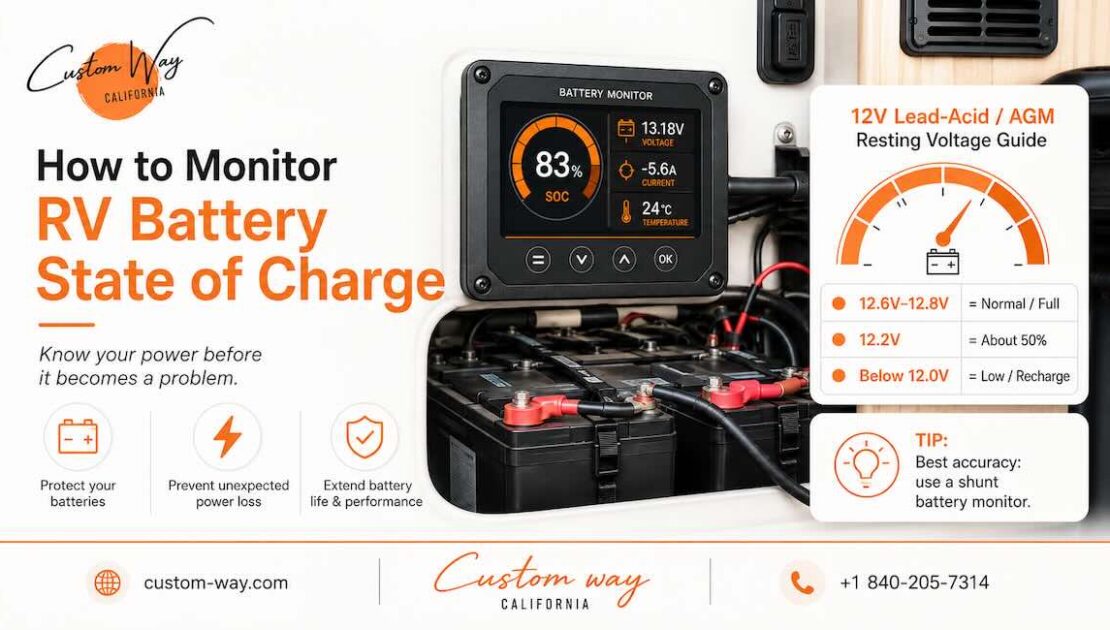
Your RV battery can look fine one moment and leave you without lights, water pump, fridge control power, furnace fan, or inverter power a few hours later. That is why monitoring the battery state of charge is not just a “nice feature” in an RV. It is part of making the whole electrical system predictable.
State of charge, often written as SOC, means how much usable energy is left in the battery. Think of it like a fuel gauge, but for your RV electrical system.
The tricky part is that many RV owners look only at battery voltage and think they know how full the battery is. Sometimes that works roughly. Sometimes it is completely misleading, especially with lithium batteries.
Why RV Battery State of Charge Matters?
Your RV battery powers more than people usually realize.
Even when you are not using big appliances, the battery may feed:
- Interior lights
- Water pump
- Furnace fan
- Refrigerator control board
- Slide-out controls
- Leveling system
- USB outlets
- Inverter
- Wi-Fi router or security system
- Propane detector and other safety devices
If you do not know the real battery level, you are guessing. That guess can turn into a dead battery, damaged battery bank, or a failed camping trip.
A proper battery monitor helps you understand:
- How much power is left
- How much current is being used right now
- How fast the battery is charging
- How long the system can run
- Whether solar, alternator charging, shore power, or generator charging is working correctly
Renogy’s battery monitor documentation describes this type of monitor as a device that can show charge percentage, remaining amp-hours, voltage, current, power, and estimated remaining time.
The Simple Method: Check Battery Voltage
The easiest way to estimate RV battery charge is by checking voltage. You can use a multimeter, an RV control panel, or a built-in battery display.
This is simple, but not very precise.
Voltage can be affected by:
- Recent charging
- Current load
- Battery age
- Temperature
- Battery chemistry
- Solar charging during the day
- Inverter load
For example, if the furnace fan or inverter is running, voltage may drop lower than the real resting condition. If the battery was just charged, voltage may look higher than the real usable state.
Voltage is most useful when the battery has been resting with no charge and no load for a while. In real RV life, that does not happen often.
Why Voltage Is Not Enough for Lithium Batteries
If your RV has lithium batteries, voltage becomes even less useful as a “fuel gauge”.
Lithium iron phosphate batteries, also called LiFePO4, hold voltage very steadily through much of their discharge range. That means the battery may look “fine” by voltage, then drop quickly near the end.
This is one reason many lithium RV setups use a proper shunt-based battery monitor instead of relying only on voltage.
Battle Born notes that lithium battery charging depends on compatible charging parameters, not just generic lead-acid settings. For their 12V LiFePO4 batteries, they recommend chargers that offer 14.2 to 14.6V bulk/absorb and 13.6V float compatibility.
Best Method: Install a Battery Monitor With a Shunt
The most accurate practical way to monitor RV battery state of charge is a battery monitor with a shunt.
A shunt is installed in the negative side of the battery circuit. It measures current going in and out of the battery. The monitor then calculates how much capacity is left.
This gives you much better information than voltage alone.
A good shunt-based monitor can show:
- Battery percentage
- Amp-hours used
- Charging current
- Discharging current
- Voltage
- Watts being used
- Estimated time remaining
- Historical usage
Renogy’s installation guide shows the shunt connected in series with the negative battery circuit and specifically warns not to connect the shunt to the positive circuit.
How a Shunt Battery Monitor Works
A shunt monitor counts energy in and out.
Example:
You have a 200Ah battery bank.
You use:
- Lights: 3A
- Water pump: 5A when running
- Furnace fan: 7A
- Inverter load: 40A
The monitor sees these loads and subtracts used amp-hours from the total battery capacity. When the battery charges from solar, shore power, generator, or alternator, it counts energy going back in.
This is much closer to a real fuel gauge than voltage.
Important: The Monitor Must Be Installed Correctly
A battery monitor is only accurate if it is wired correctly.
All negative cables from loads and chargers must pass through the shunt correctly. If one charger or load bypasses the shunt, the monitor will not see that current. Then the state of charge will slowly become wrong.
Typical wiring idea:
- Battery negative goes to battery side of shunt
- RV loads and chargers connect to the load side of shunt
- Positive sensing wire is connected through proper fuse protection
- Battery capacity is entered into monitor settings
- Battery type and charge settings are configured correctly
If the shunt is installed backward or some cables bypass it, the monitor may show strange numbers, stay at 100%, drop too quickly, or never reach full charge.
Victron’s troubleshooting documentation explains that state of charge is calculated by looking at current flowing in and out of the battery, so incorrect current readings lead to incorrect SOC readings.
Set the Correct Battery Capacity
After installation, you need to tell the monitor how large your battery bank is.
Examples:
- One 100Ah lithium battery: set 100Ah
- Two 100Ah batteries in parallel: set 200Ah
- Four 100Ah batteries in parallel: set 400Ah
If you set the wrong capacity, the monitor will calculate the wrong percentage.
If your battery bank is old, the real usable capacity may be lower than the label. A five-year-old battery may not deliver the same energy as when it was new.
Synchronize the Battery Monitor
Most shunt monitors need synchronization.
This means the monitor needs to know when the battery is truly full so it can reset the SOC to 100%.
Victron explains that automatic synchronization happens when the monitor detects full charge conditions, including charged voltage, tail current, and charged detection time. If these settings are wrong or the battery is not occasionally fully charged, the SOC value can drift and stop representing the real battery condition.
In simple words: even a good monitor needs correct setup.
Use a Smart Lithium Battery App
Some lithium batteries have built-in Bluetooth BMS monitoring.
This can show:
- Battery percentage
- Cell voltage
- Temperature
- Charge and discharge current
- Fault warnings
- Protection status
This is useful, but it monitors only that battery. If you have multiple batteries, you may need to check each one separately unless the system is designed as a connected bank.
A smart BMS app is helpful, but for the full RV electrical system, a shunt monitor is usually more useful because it shows what the entire battery bank is doing.
Use Your Solar Charge Controller App
If your RV has solar, your solar charge controller may also show battery voltage, solar input, charge current, and daily production.
This is useful, but it is not the same as a full battery monitor.
A solar controller mainly shows what solar is doing. It may not see all loads and all charging sources.
For example, it may not fully account for:
- Shore power charging
- Generator charging
- Alternator charging
- Inverter consumption
- Loads connected outside the controller
So solar app data is helpful, but it should not be your only way to judge battery SOC.
Use Your Inverter or Charger Display
Some modern inverter-chargers show battery data too.
They may show:
- Battery voltage
- Charge mode
- Current draw
- AC load
- Charging current
- Error codes
This helps you understand the system, but again, it may not be as complete as a dedicated shunt monitor unless it is part of a fully integrated electrical setup.
Lead-Acid vs AGM vs Lithium Monitoring
Different battery types behave differently.
Flooded Lead-Acid Batteries
These can be checked by voltage, and in some cases by specific gravity using a hydrometer. They need more maintenance, proper ventilation, and careful charging.
AGM Batteries
AGM batteries are sealed and easier to maintain, but voltage still gives only a rough SOC estimate under real RV conditions.
Lithium Batteries
Lithium batteries are excellent for RV use, but they need proper monitoring, correct charging settings, and a compatible electrical system. Voltage alone is not enough for accurate day-to-day monitoring.
What Numbers Should You Watch?
A good battery monitor gives a lot of information, but these are the main numbers to watch.
State of Charge Percentage
This is the simple “how full is my battery?” number.
Voltage
Still useful, especially for spotting abnormal conditions.
Current
This tells you whether the battery is charging or discharging.
For example:
- +20A means charging
- -20A means discharging
Some monitors display this differently, so check your device.
Watts
This helps you understand how much power your RV is using.
Time Remaining
Useful, but not perfect. It changes based on current load. If your inverter load changes, the estimate changes too.
Amp-Hours Used
This is very useful for understanding real consumption.
Common Battery Monitoring Problems
Many RV owners install a monitor and still get bad readings. Usually, the problem is not the monitor itself.
Common causes include:
- Wrong battery capacity setting
- Shunt wired backward
- Some negative cables bypassing the shunt
- Battery never fully charged for synchronization
- Wrong lithium or lead-acid settings
- Poor connections
- Weak battery bank
- Parasitic drain somewhere in the RV
Victron notes that if the monitor does not reach 100%, the battery should be fully charged and the charged voltage, tail current, and charged time settings may need adjustment.
How to Know If Your RV Has a Battery Drain
A battery monitor is great for finding hidden power consumption.
Turn off everything you think is off. Then check the current draw.
If the monitor still shows current leaving the battery, something is using power.
Possible hidden loads:
- Propane detector
- Stereo memory
- Inverter standby mode
- Wi-Fi router
- Refrigerator control board
- Tank monitor system
- Aftermarket accessories
- Poor wiring or relay issues
Small drains add up. A 1 amp draw can use 24Ah in one day. Over several days, that can seriously drain a battery.
Best Setup for Reliable RV Battery Monitoring
For a modern RV, the best setup is usually:
- Lithium battery bank or healthy AGM bank
- Shunt-based battery monitor
- Properly configured solar controller
- Compatible converter or inverter-charger
- Clean fuse and breaker layout
- Correct cable sizing
- Battery disconnect switch
- Clear labels for service access
This gives you control instead of guessing.
Can Custom-way Help With RV Battery Monitoring?
Yes. At Custom-way, we help RV owners upgrade and troubleshoot their electrical systems so the battery bank is easier to understand and more reliable on the road.
We can help with:
- RV battery monitor installation
- Smart shunt installation
- Lithium battery upgrades
- Solar system setup
- Inverter and charger installation
- Battery drain diagnostics
- Wiring cleanup and protection
- Electrical panel upgrades
- Full off-grid power system planning
A battery monitor is a small device, but it works best when the whole system is wired correctly. If your RV has old wiring, mixed battery types, weak charging, or confusing previous modifications, we can inspect the setup and build a cleaner solution.
A Good Battery Monitor Makes RV Life Easier
Monitoring RV battery state of charge is about confidence.
You know when to charge. You know how long your power will last. You know whether the solar panels are doing their job. You can spot problems before they leave you without power.
For basic setups, voltage can give a rough idea. For serious RV use, especially with lithium batteries, a shunt-based monitor is the better solution.
A properly installed battery monitor turns your RV electrical system from a guessing game into something you can actually trust.